How to Automate a Manual Trading Strategy
Last Updated: November 2026
Most traders think automation starts with software.
It does not.
It starts with explaining exactly why you take each trade.
A manual trader may look at a chart and immediately recognize what feels like a good setup. They may notice trend quality, volatility, price behavior around support, momentum, or whether a breakout "looks clean."
That process can work manually because the trader is making judgments in real time.
An automated system cannot make the same judgment unless those decisions are translated into observable conditions.
This is why the hardest part of automating a manual trading strategy is rarely placing orders automatically.
It is uncovering the rules that were previously living inside the trader's head.

The hardest part of automating a manual strategy is not execution. It is making hidden discretion explicit.
Once the decision process becomes precise enough, automation can take several forms.
The system might only alert you when a setup appears.
It might identify the setup while you approve the final trade.
Or it can manage the complete process from entry through exit without manual intervention.
The correct level depends on how objective your strategy really is.
Quick Answer
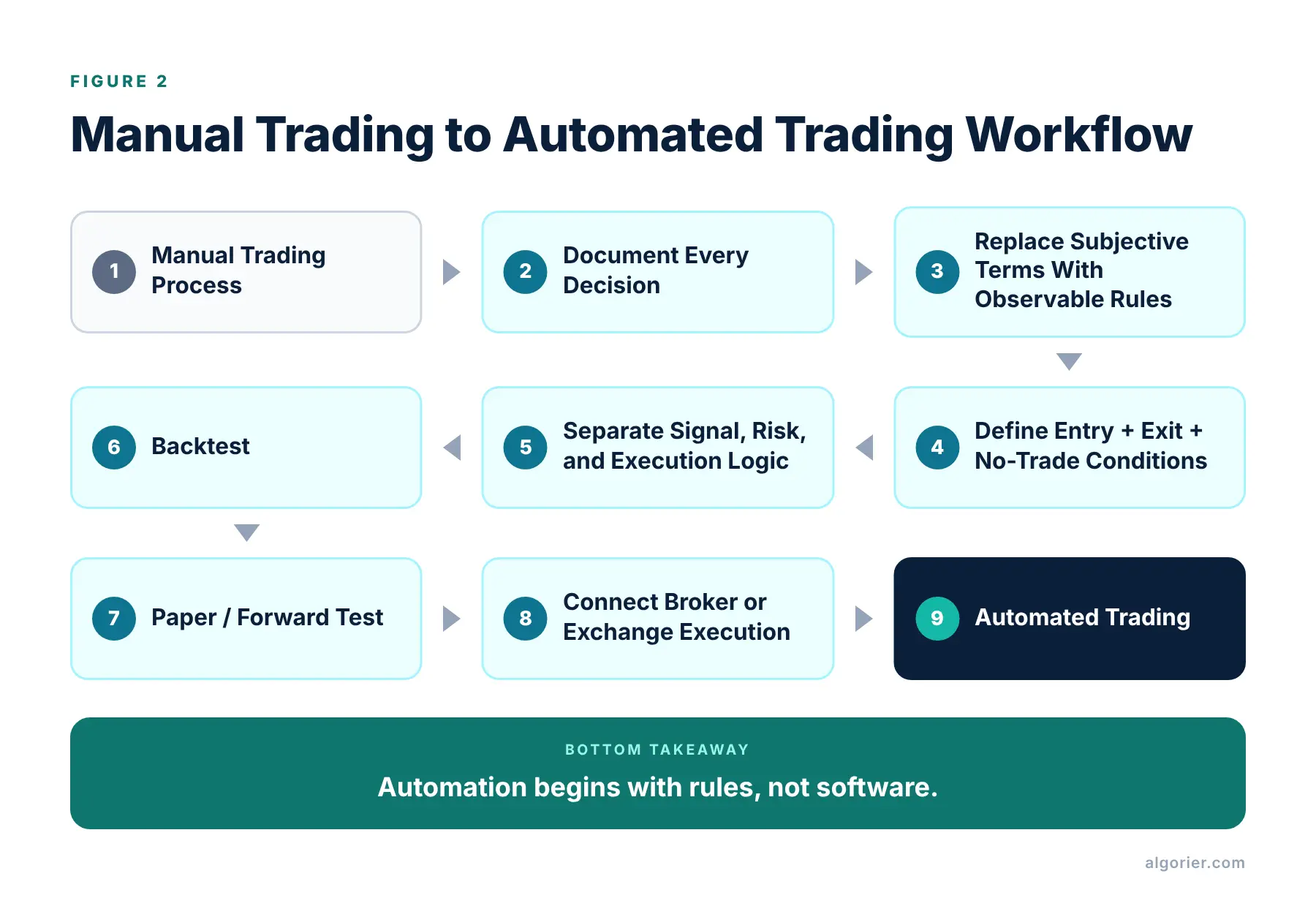
To automate a manual trading strategy, first document every decision you currently make, then convert subjective judgments into observable rules for entries, exits, risk, and conditions where you do not trade. Backtest the automated interpretation before connecting it to live execution, then use paper or forward testing to check whether the system behaves as intended. You can automate through custom code, visual builders, alert-to-broker workflows, or plain-English AI platforms. Algorier's AlgoBuild is designed for the latter approach: traders can describe entry logic, exit conditions, risk rules, timeframe, and markets in plain English, while the platform generates and backtests the underlying algorithm without requiring the trader to write the code.
Automation does not improve a weak strategy automatically.
It simply executes the rules more consistently.
Automation removes hesitation. It does not create edge.
What Does It Mean to Automate a Manual Trading Strategy?
Manual trading means some part of the trading decision is made by a human at the time of execution.
That could include deciding:
whether a setup exists
whether market conditions are suitable
when to enter
where to place the stop
when to exit
how much capital to risk
when to avoid trading
Automating the strategy means converting some or all of those decisions into conditions a system can evaluate consistently.
For example, a manual trader might say:
"I buy when momentum improves after a pullback."
An automated system needs something more precise.
It might need:
"On BTC/USDT using the 1-hour timeframe, enter long when price is above the 200 EMA, RSI(14) has fallen below 35, and RSI then closes back above 35."
Now the system can evaluate the same conditions on every candle.
Automation therefore requires a shift from:
judgment
to:
definition
to:
execution
Can Every Manual Trading Strategy Be Automated?
No.
Some strategies are already almost completely rule-based.
Others contain so much subjective judgment that full automation would require changing the strategy itself.
Consider the difference.
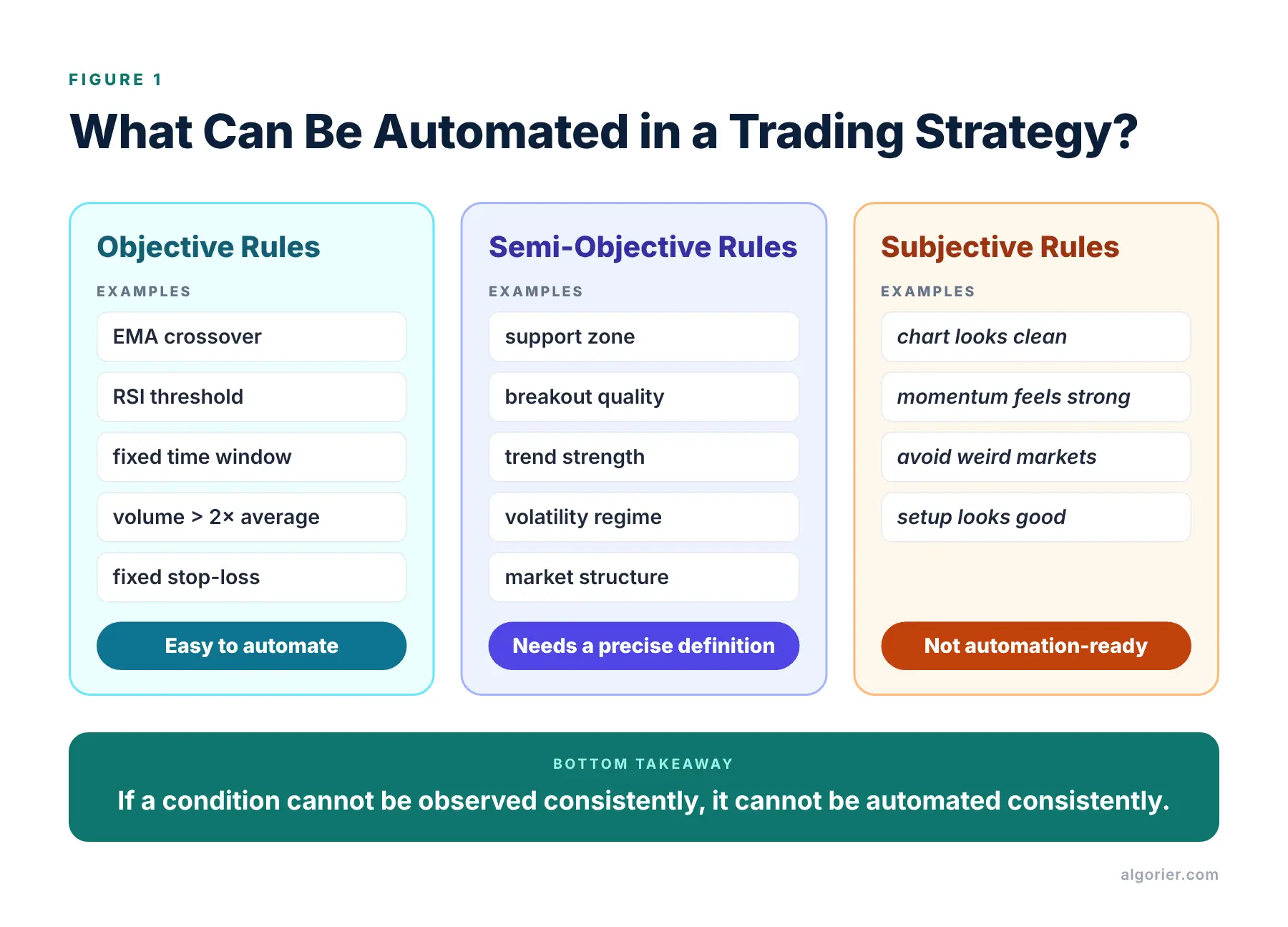
Manual Decision | Automation Potential |
|---|---|
Buy when the 20 EMA crosses above the 50 EMA | High |
Enter only when volume is above twice its 20-period average | High |
Trade only between 09:30 and 11:00 | High |
Buy near major support | Medium |
Trade only when the breakout looks clean | Low until defined |
Avoid the market when conditions feel strange | Not automation-ready |
The problem is not that concepts such as "support" or "clean breakout" are impossible to automate.
The problem is that the trader has not yet specified what those words mean.
Every subjective adjective is a potential automation bug.
A useful test is to imagine two disciplined traders looking at the same chart.
If both would consistently identify the same setup using your written rules, the strategy is moving toward automation readiness.
If they could reasonably disagree about whether the setup exists, more definition is needed.
Three Levels of Trading Automation
Automation does not have to be all or nothing.
1. Alert Automation
The system monitors the market and tells you when predefined conditions occur.
The human still decides whether to trade.
Workflow:
Market condition detected → Alert → Human decision
This is often the safest first step for discretionary traders because it removes repetitive monitoring without removing judgment.
It also helps test whether your written rules actually identify the setups you intended.

2. Semi-Automation
The system handles part of the process while the trader controls another part.
Examples include:
system finds the setup, trader approves entry
trader enters manually, system manages stop and target
system enters automatically, trader manages exit
system sends signals but does not place orders
This can be ideal when the setup itself is objective but final confirmation still depends on context.
3. Full Automation
The complete decision chain becomes systematic:
Condition → Entry → Position Management → Exit
No manual approval is required once the system is running.
This demands much more precise rules.
The strategy must account not only for ideal setups, but also for:
duplicate signals
existing open positions
conflicting conditions
stop execution
maximum exposure
trading-session rules
situations where trading should stop
Full automation should usually be the final stage, not the first.
How to Automate a Manual Trading Strategy: Step by Step
Step 1: Document Every Decision You Currently Make
Start by writing down what you actually do, not what you think your strategy is.
A trader may believe their strategy is:
"I buy breakouts."
But the real process might be:
trade only in an existing uptrend
wait for consolidation
require higher-than-normal volume
avoid entries after an oversized candle
skip trades during certain news events
place the stop below consolidation
exit partially at one target
trail the remainder
Those additional decisions are part of the strategy.
If they are not included in the automation specification, the automated version will not behave like the manual version.

Step 2: Highlight Every Subjective Term
Review the strategy and mark words such as:
strong
weak
clean
major
close to
high volume
oversold
extended
good momentum
normal volatility
Each one requires a definition.
For example:
"High volume"
could become:
Current candle volume must be at least 1.5 times the 20-period average volume.
"Strong uptrend"
could become:
Price is above the 200 EMA and the 50 EMA is above the 200 EMA.
"Price is extended"
could become:
Price is more than 2 ATR above the 20 EMA.
The precise definition is strategy-specific.
What matters is eliminating hidden interpretation.
Step 3: Define Entries and Exits Separately
A strategy is not automation-ready just because the entry rule is clear.
You also need exact exit logic.
For an entry, define:
market
timeframe
setup conditions
trigger
order timing
For an exit, define:
stop-loss
profit target
trailing rules
opposite signal
time-based exit
maximum holding period
A common automation mistake is to formalize the entry while leaving the exit discretionary.
That produces an incomplete system.
Step 4: Define When the Strategy Must Not Trade
This is where many manual-to-automated conversions fail.
Experienced traders often have unwritten filters.
They may skip a trade when:
spread is unusually wide
volatility is too high
liquidity is poor
a position is already open
maximum daily loss has been reached
the market is outside the intended session
Those conditions need to become part of the specification too.
A good automation specification defines both when to trade and when not to trade.
The next step is separating signal logic, risk logic, and execution logic, then testing whether the automated interpretation still behaves like the strategy you originally traded manually.
Step 5: Separate Signal Logic, Risk Logic, and Execution Logic
A manual trader often blends several decisions into one moment.
An automated system should not.
Break the strategy into three layers.
Signal logic answers:
Should a trade exist?
For example:
price above the 200 EMA
RSI crosses above 35
volume exceeds its 20-period average
Risk logic answers:
How much should be risked?
This includes:
position size
leverage
maximum exposure
maximum drawdown
daily loss limits
Execution logic answers:
How should the trade actually enter and exit the market?
This includes:
market vs limit order
entry on candle close vs next open
stop placement
take-profit placement
handling partial or rejected fills
Keeping these layers separate makes the strategy easier to test and easier to change safely.
For example, changing position size should not silently change the condition that generates a signal.

Algorier follows this separation. AlgoBuild generates the rules behind entries and exits without baking one universal leverage or volume setting into the algorithm. Users can later configure leverage, position size, and drawdown caps separately.
Step 6: Backtest the Automated Interpretation
Do not assume that because a strategy works manually, its formalized version will behave the same way.
Your manual process may contain filters you did not realize you were using.
Once the rules are translated into a system, backtest them.
The first goal is not to maximize return.
It is to answer:
Did we automate the strategy I actually intended to trade?
Review individual trades.
Look for situations where the automation:
entered when you would not have entered
skipped a setup you would have taken
exited too early
remained in a position too long
generated duplicate signals
traded during conditions you normally avoid
If these differences are systematic, the specification is incomplete.
Do not immediately "optimize" the strategy around every bad trade.
First decide whether the problem is:
bad strategy logic
or
bad translation of the manual strategy.
Those are not the same problem.
Do not automate a strategy merely because you already trade it manually. Automation scales both good rules and bad rules.
Step 7: Choose Alert, Semi-Automated, or Fully Automated Execution
Once the automated interpretation behaves reasonably in testing, choose how much control to hand over.
A trader with objective entry rules but discretionary context may start with alerts.
TrendSpider, for example, currently allows rules-based strategies to operate as alerts or Strategy Bots. Bots can track their own long, short, or flat state and send notifications or webhooks, while automated brokerage execution can be connected separately through supported routing services.
That makes it possible to move gradually:
rules detect setup → notification → human approval
then later:
rules detect setup → webhook → execution system → broker
A staged rollout is usually more useful than jumping straight into full automation because it exposes interpretation errors before they become real trades.

Step 8: Paper Trade or Forward Test the Strategy
A historical backtest cannot reproduce every detail of live operation.
Forward or simulated testing lets you observe the system on new data.
This matters because execution introduces issues that may not have appeared historically:
latency
slippage
partial fills
different price feeds
missed orders
connection failures
Capitalise.ai's current documentation, for example, explicitly distinguishes backtest, simulation, and live modes. It notes that simulations and backtests do not place real orders, do not experience actual partial fills in the same way, and can differ from live trading because of slippage and execution prices.
This is why the workflow should not be:
backtest looks good → immediately automate real capital
A safer research sequence is:
backtest → paper/simulation → forward observation → small controlled live deployment
None of these stages guarantees future profitability.
They simply expose different failure modes.
Example: Turn a Discretionary Setup Into Automated Rules
Suppose the manual strategy is:
I buy Bitcoin pullbacks when the trend is strong and the selling looks exhausted.
That is understandable to a human trader.
It is not automation-ready.
A formalized version might become:
Trade BTC/USDT on the 1-hour timeframe. Define an uptrend when price closes above the 200 EMA and the 50 EMA is above the 200 EMA. Define a pullback when RSI(14) falls below 35. Enter long when RSI closes back above 35 while both trend conditions remain true. Place a stop below the lowest low of the previous five candles and exit at a target equal to twice the initial risk.
Illustrative example only.
Now the subjective phrases have been replaced.
"Strong trend" became two observable conditions.
"Selling looks exhausted" became a defined RSI event.
The entry trigger is explicit.
The stop has a formula.
The target has a formula.
You can now ask meaningful questions about the automation.
Does the system enter on candle close?
What happens if another signal appears while a position is open?
Does it allow more than one position?
What happens after a stopped-out trade?
These details are where a manual idea becomes an actual trading system.

How to Automate a Trading Strategy Without Coding
Coding is no longer the only route.
There are several distinct no-code automation models.
Plain-English Strategy Automation
This is the closest fit for traders who already know their rules but do not want to translate them into Python or another programming language.
Capitalise.ai currently allows users to describe entry and exit strategies in plain English, backtest them, simulate them, and run the resulting strategies live. It also includes a confirmation stage where users review the interpreted conditions before selecting live, simulation, or backtest mode.
Algorier follows a broader algorithm-building workflow: a trader describes entry logic, exits, risk rules, timeframe, and markets in plain English, while AlgoBuild generates and centrally backtests the resulting algorithm.
The important discipline in either model is the same:
Review what the system understood before allowing it to trade.
Visual Strategy Builders
Platforms such as TrendSpider are useful for traders whose strategy can be represented through indicators, conditions, and rules.
TrendSpider Strategy Bots can run a saved backtested strategy, generate position-aware entry and exit signals, and send those signals through notifications or webhooks. Its documentation recommends first backtesting the strategy and then running the bot with control notifications before connecting trading webhooks.
That staged process is exactly what manual traders should want.
Signal-to-Broker Bridges
Sometimes the strategy already exists elsewhere.
For example, you may already generate signals in TradingView or TrendSpider.
In that case, the missing layer is execution.
TradersPost is an example of this architecture. Signals are created externally and sent through webhooks to TradersPost, which processes them and submits corresponding trades to connected brokers or exchanges.
That makes TradersPost closer to an execution bridge than a strategy-definition engine.
AI-Assisted Portfolio Automation
Composer takes another route. Its current Trade with AI workflow can help users discover or create rule-based "symphonies" without coding, shows the logic, backtests, and risk statistics, and requires user confirmation before automated trading begins.
The right tool therefore depends on which part of your manual workflow is missing.
If you need rules translated into an algorithm, use a strategy-building system.
If you already have the rules but want alerts, use an alert or bot workflow.
If you already generate signals and only need order routing, use an execution bridge.
How Algorier Turns a Manual Strategy Into an Automated Algorithm
Algorier is especially suited to traders who already understand how they trade but do not want to become programmers just to automate that process.
The workflow is direct:
Describe the rules in plain English
→ AlgoBuild generates the algorithm
→ The strategy is centrally backtested
→ Review and refine the rules
→ Optionally Forward Test
→ Configure personal risk
→ Choose live, signal-only, or live plus signal deployment
Algorier currently supports all three deployment modes, and risk settings such as leverage, position size, and drawdown cap remain configurable independently of the underlying strategy.
When connected for live use, strategy signals can generate orders in the user's own connected exchange or broker account, sized according to the user's settings.
The important limitation remains the same:
AI cannot rescue a strategy that is still described as:
"Buy when the chart looks good."
The trader still needs to decide what "good" means.
AI can help formalize discretionary logic. It should not silently invent the missing trading logic for you.
The final stage is therefore not simply switching automation on. It is checking whether the system is robust enough, operationally complete enough, and sufficiently tested to deserve that level of control.
Common Trading Automation Mistakes
Automating the rules is only half the job.
The other half is making sure the system behaves sensibly when the market, broker, or strategy does something unexpected.
Several mistakes appear repeatedly.
Automating Before the Strategy Is Defined
If the manual strategy still depends on phrases such as:
"strong momentum"
"clean breakout"
"good support"
"bad market"
then full automation is premature.
The problem is not the software.
The strategy specification is incomplete.
Optimizing the Strategy While You Automate It
Automation and strategy development are separate tasks.
If you change:
indicators
thresholds
stops
filters
timeframes
every time the backtest disappoints you, you may end up optimizing the strategy to historical noise.
First reproduce the manual strategy as accurately as possible.
Then evaluate it.
Only then should you decide whether changes are justified.
Forgetting No-Trade Conditions
A bot needs to know when to stay inactive.
Examples include:
maximum daily loss reached
position already open
spread above threshold
wrong trading session
volatility outside expected range
insufficient liquidity
Manual traders often apply these filters subconsciously.
Automation does not.
No Position-Sizing Rule
An entry signal is not a complete trading system.
The automation needs a risk framework.
That could include:
fixed position size
percentage-of-equity risk
volatility-based sizing
leverage limits
portfolio exposure limits
The strategy should not accidentally take more risk merely because multiple signals arrive close together.
No Kill Switch
A fully automated strategy should have conditions that can stop or limit trading.
Examples include:
maximum drawdown
maximum daily loss
maximum number of consecutive losses
unexpected execution errors
broker disconnection
Automation should reduce operational dependence on the trader, not remove every safety boundary.
Assuming Orders Always Fill as Expected
Backtests often simplify execution.
Live markets do not.
Orders can experience:
slippage
partial fills
rejected orders
delayed execution
gaps
An execution-sensitive strategy should be tested with those realities in mind.
Ignoring Duplicate or Conflicting Signals
What happens if another long signal appears while a long position already exists?
Does the system:
ignore it?
add to the position?
reset the stop?
open another order?
There should be an explicit answer.
Using Automation to Fix a Weak Strategy
Automation can make execution more consistent.
It cannot create a statistical edge that the original strategy did not have.
Automation removes hesitation. It does not create edge.
How to Know When a Strategy Is Ready for Full Automation
A strategy is closer to full automation when most of the following are true.
Two People Would Interpret the Rules the Same Way
If two disciplined traders can read the specification and identify the same entries and exits, ambiguity has been reduced.
Every Entry Has a Defined Exit
There is no:
"I'll decide when I see the market."
That is still discretionary.
Exceptions Are Documented
The strategy specifies not only when to trade but when to remain inactive.
Risk Is Explicit
Position sizing, leverage, maximum loss, and exposure are defined separately from the trading signal.
Historical Testing Matches the Intended Behavior
You have inspected individual trades and confirmed that the automated version is actually implementing the intended strategy.
New Data Has Been Observed
Paper trading or forward testing has given you evidence that the system continues to behave operationally after development.
Execution Failure Has a Plan
You know what happens when:
an order fails
a connection drops
duplicate signals occur
the platform restarts
a position exists when the automation comes back online
If these questions have no answers, the system may be algorithmic without being operationally complete.
Final Automation Checklist
Before switching a manual strategy to full live automation, verify:
Market and timeframe are explicit.
Entry conditions are objective.
Exit conditions are objective.
No-trade conditions are defined.
Signal logic is separated from risk logic.
Execution rules are documented.
Position sizing is explicit.
Maximum exposure is limited.
Maximum loss or drawdown controls exist.
Duplicate signals are handled.
Open-position behavior is defined.
The automated version has been backtested.
Individual test trades have been reviewed.
Fees and execution assumptions are realistic.
The final strategy has been observed on new data.
Broker or exchange connectivity has been tested.
A failure or kill-switch process exists.
If several of these are missing, the strategy is not ready for unattended execution.
Final Verdict
Automating a manual trading strategy is not mainly a programming problem.
It is a specification problem.
The trader has to take decisions that may currently feel intuitive and turn them into conditions that can be observed consistently.
That means defining:
what creates a setup
what confirms an entry
what invalidates it
what closes the trade
what prevents trading
how much risk is allowed
how orders should be executed
Only after those decisions become explicit should software take over.
For traders who can already explain how they trade but do not want to write the underlying code, Algorier provides a direct path from plain-English rules to generated algorithm, centralized backtest, optional Forward Test, and live or signal-based deployment.
That does not remove the trader from the research process.
It changes where the trader's effort goes.
Instead of spending that effort on programming syntax, the trader can spend it defining and validating the strategy.
Automation begins with rules, not software.
And the final test is simple:
If you cannot explain exactly why the system should enter, exit, or stay out of the market, the strategy is not ready for full automation.
Frequently Asked Questions
How do I automate a manual trading strategy?
Document every decision you currently make, convert subjective judgments into measurable rules, define entries, exits, risk, and no-trade conditions, then backtest the automated interpretation before connecting it to live execution.
Can I automate a trading strategy without coding?
Yes. Plain-English AI platforms, visual strategy builders, and signal-to-broker automation tools can automate rule-based strategies without requiring you to write traditional code.
Can discretionary trading be automated?
Sometimes.
Objective parts can often be automated fully. More subjective decisions may require additional formalization or may remain better suited to alerts or semi-automation.
How do I turn my trading strategy into a bot?
First translate the strategy into explicit rules. Then use code, a visual builder, or an AI algorithm-building platform to implement those rules, backtest them, and connect the resulting system to execution.
Can AI automate my trading strategy?
AI can help translate a well-defined strategy into executable logic. It should not be relied on to invent missing rules or determine what vague discretionary judgments mean without your review.
What parts of a trading strategy can be automated?
Entries, exits, stops, targets, position sizing, time filters, risk limits, alerts, and order execution can all be automated when the rules are sufficiently explicit.
Should I backtest before automating?
Yes. Backtesting helps verify that the formalized strategy behaves as intended before real orders are involved.
Can I automate entries but keep exits manual?
Yes. Semi-automated workflows can automate only selected parts of the strategy, such as setup detection or entry execution, while leaving final decisions to the trader.
Is automated trading better than manual trading?
Not automatically.
Automation is stronger for consistent execution of explicit rules. Manual trading may remain better suited to strategies that depend heavily on context, judgment, or information that has not been formalized.
How do I know if my strategy is ready for automation?
It is closer to automation-ready when another trader could read the written rules and identify the same setups, exits, and no-trade conditions consistently.
References
Algorier. Algorier Platform Whitepaper, Version 1.1. September 2026. Product information concerning AlgoBuild, plain-English strategy creation, centralized backtesting, buyer risk settings, execution, and deployment modes.
TrendSpider. “Trade Timing and Execution Tools.” Current documentation covering strategy alerts, bots, notifications, and webhook-based automation.
TrendSpider. “Trading Bots.” Current documentation covering position-aware bots, strategy testing, notifications, and staged deployment.
Capitalise.ai. “About Capitalise.ai.” Current documentation covering plain-English strategy creation, backtesting, simulation, and live automation.
Capitalise.ai. “Differences Between Modes.” Current documentation distinguishing historical backtests, simulations, and live trading behavior.
TradersPost. “Webhooks.” Current documentation describing signal-to-broker execution workflows.
Composer. “What Is Trade with AI?” Current documentation covering AI-assisted strategy creation, backtesting, user confirmation, and automated trading.
Risk Disclaimer
Trading involves substantial risk and can result in partial or total loss of capital.
Automation can increase the speed and consistency of execution, but it can also execute flawed rules repeatedly and without hesitation.
Backtests, simulations, Forward Tests, paper trading, and previous live results do not guarantee future performance.
Live execution may differ from historical or simulated results because of slippage, latency, spreads, liquidity, partial fills, rejected orders, outages, and other operational factors.
Automated systems should be monitored and should include appropriate risk and failure controls.
About the Author
Written by: Algorier Research Team
Last Updated: November 2026
The Algorier Research Team covers algorithmic trading, trading strategy development, backtesting, systematic risk, strategy evaluation, and trading automation.